
Fixing Cloudflare WARP on Fedora 44 With Nix Home-Manager
End of April, the Fedora team released F44. After a few weeks of wait-and-see, I upgraded at the end of May. I have run Fedora on my main Linux workstations for 10+ releases now, and recent upgrades have been remarkably smooth - nothing unforeseen breaking.
Typically, the main concern is Gnome Extensions: ensuring whichever ones you use support the Gnome version shipping with the next Fedora release. This can sometimes take a bit of time for maintainers to update, but it is easy enough to check. I wrote a short article on that topic in the past: Ensuring Gnome Extensions Compatibility Before a Fedora Upgrade.
This time with Fedora 44, however, I was blindsided by a third-party repo that is fairly important to some of my workflows: warp-cli, the client for Cloudflare One and WARP.
The issue at hand
On Linux - and specifically Debian-based and RHEL-based distros - warp-cli installs from a private repository supplied by Cloudflare.
As of June 21st, the officially supported versions are:
CentOS 8, RHEL 8, RHEL 9, Debian 12, Debian 13, Fedora 34, Fedora 35, Ubuntu 22.04 LTS, Ubuntu 24.04 LTS
Frankly, that’s not great for an enterprise solution. RHEL 10 was released more than a year ago, the latest Ubuntu LTS is missing, and Fedora 35 has been EOL for almost four years. Debian support, at least, is current.
The breaking change
On Fedora, warp-cli continued to install regardless of official support through F43. With F44, it breaks due to a missing dependency. Running the install command yields:
$ dnf install cloudflare-warp

Failed to resolve the transaction:
Problem: conflicting requests
  - package cloudflare-warp-2026.4.1390.0-1.aarch64 from cloudflare-warp-stable does not have a compatible architecture
  - nothing provides webkit2gtk3 needed by cloudflare-warp-2026.4.1390.0-1.aarch64 from cloudflare-warp-stable
  - nothing provides webkit2gtk3 needed by cloudflare-warp-2026.4.1390.0-1.x86_64 from cloudflare-warp-stable
You can try to add to command line:
  --skip-broken to skip uninstallable packages
Unfortunately, there is not much to be done here - webkit2gtk3 no longer ships with Fedora 44 - other than waiting for the Cloudflare team to finally update their dependencies.
Or so I thought.
Installing warp-cli anyway, thanks to Nix
Nix is now fully supported on Fedora 44, as I briefly mentioned in my Nix adoption post.
As it turns out, Nix is perfectly suited to handle dependency issues like this. Nix isolates every package and its dependencies in its own store path. Since each package or version lives in a unique path, this guarantees zero conflicts between different versions or libraries. We can therefore restore the broken webkit2gtk3 dependency for warp-cli in a straightforward way - without touching the distribution’s system packages.
Even better: the Nix repository already packages warp-cli, so much of the work - including tracking future updates - is already handled for us.
The toolchain
To bring back warp-cli to Fedora 44, we will specifically be leveraging:
nix- package managerhome-manager- to ensure the package is permanently available to our userflakes- to declaratively manage the required packages and configuration- the Nix package
cloudflare-warp
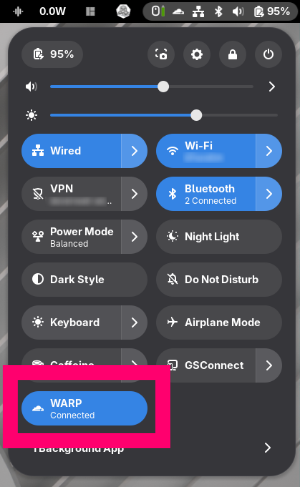
The Nix package might not come with a status indicator - I am not sure. I personaly use the Gnome Extension cloudflare-warp-toggle for that, as it provides a nicer and more Gnome-native appearance.
Step-by-Step
Covers:
- first-time home-manager setup
- cloudflare-warp install
- systemd service
- SELinux policy adjustments
- warp-cli registration and connection
And assumes Nix multi-user is already installed.
0. Remove existing RPM (if present)
Most likely no longer present after upgrading from F43 to F44, but for good measure…
sudo dnf remove cloudflare-warp
sudo systemctl daemon-reload
1. Home-Manager Setup
First, create the home-manager configuration directory:
mkdir -p ~/.config/home-manager
Now, add a flake to set up home-manager for your user. We will use the latest tagged release (26.05) because we do not need bleeding-edge packages here, though nothing prevents you from using unstable.
~/.config/home-manager/flake.nix
{
  description = "Home Manager configuration";

  inputs = {
    nixpkgs.url = "github:nixos/nixpkgs/nixos-26.05";
    home-manager = {
      url = "github:nix-community/home-manager/release-26.05";
      inputs.nixpkgs.follows = "nixpkgs";
    };
  };

  outputs = { nixpkgs, home-manager, ... }:
    let
      system = "x86_64-linux";
      pkgs = import nixpkgs {
        inherit system;
        config.allowUnfree = true; # required for cloudflare-warp
      };
    in {
      homeConfigurations."YOUR_USERNAME" = home-manager.lib.homeManagerConfiguration {
        inherit pkgs;
        modules = [ ./home.nix ];
      };
    };
}
Then, create a configuration file for the packages you want home-manager to install.
~/.config/home-manager/home.nix
{ config, pkgs, ... }:

{
  home.username = "YOUR_USERNAME";
  home.homeDirectory = "/home/YOUR_USERNAME";
  home.stateVersion = "26.05";

  home.packages = with pkgs; [
    cloudflare-warp
  ];

  programs.home-manager.enable = true;
}
Bootstrap home-manager for the first time:
cd ~/.config/home-manager
nix run home-manager/release-26.05 -- switch --flake .
2. warp-svc Systemd Service
warp-svc is the daemon that the GUI and warp-cli communicate with. It must run as root - a user service is not sufficient. The ExecStart must point to the direct Nix store path (not the .nix-profile symlink) because systemd does not resolve the symlink chain correctly.
First, obtain the store path:
WARP_PATH=$(readlink -f ~/.nix-profile/bin/warp-svc)
echo $WARP_PATH  # e.g. /nix/store/i94r0d...-cloudflare-warp-2026.x.x/bin/warp-svc
Then, create the systemd service unit:
sudo tee /etc/systemd/system/warp-svc.service << EOF
[Unit]
Description=Cloudflare WARP daemon
After=network.target

[Service]
ExecStart=${WARP_PATH}
Restart=on-failure
RestartSec=5s

[Install]
WantedBy=multi-user.target
EOF
3. SELinux Relabelling
On Fedora 44 with SELinux enforcing (as it should be), policies do not allow you to run a binary from directories like /nix/store as a systemd service.
To remediate this, we need to relabel the binaries. We will label the cloudflare-warp executables as bin_t - the standard type that systemd’s domain is permitted to execute.
To make this easier - including across updates, as Nix’s hard-link deduplication (/nix/store/.links) means every upgrade produces new store-path inodes - we use a small script.
warp-relabel.sh
#!/usr/bin/env bash
#
# warp-relabel.sh  -  Re-apply SELinux bin_t labels to the cloudflare-warp closure.
#
# WHY THIS EXISTS:
#   cloudflare-warp is installed via Nix home-manager and runs as a systemd
#   system service (warp-svc) in the init_t domain. SELinux labels are per-inode,
#   but Nix store paths use hard-link dedup (/nix/store/.links) and every upgrade
#   produces new store paths labeled default_t. init_t cannot execute default_t
#   files, so warp-svc fails with status=203/EXEC after any change.
#
#   This script finds warp's current store path, walks its full runtime closure,
#   and labels every executable file bin_t so init_t can exec the wrapper chain.
#
# WHEN TO RUN:
#   - After `home-manager switch` upgrades cloudflare-warp (new store hash)
#   - After `nix-store --optimise` (re-links can reset labels)
#   - After garbage collection that re-downloads warp
#   - Any time `systemctl status warp-svc` shows status=203/EXEC
#
# USAGE:
#   sudo ./warp-relabel.sh
#
set -euo pipefail

if [[ $EUID -ne 0 ]]; then
  echo "Must run as root (need chcon + systemctl). Re-run with sudo." >&2
  exit 1
fi

# --- Resolve warp's current store path via the user's nix profile ---
# Falls back to a glob if the profile symlink isn't found.
WARP_BIN="$(readlink -f /home/guillaume/.nix-profile/bin/warp-svc 2>/dev/null || true)"

if [[ -z "${WARP_BIN}" || ! -e "${WARP_BIN}" ]]; then
  # Fallback: newest cloudflare-warp store path
  WARP_STORE="$(find /nix/store -maxdepth 1 -name '*-cloudflare-warp-*' -type d 2>/dev/null | sort | tail -1)"
else
  # /nix/store/<hash>-cloudflare-warp-<ver>/bin/warp-svc -> strip /bin/warp-svc
  WARP_STORE="$(dirname "$(dirname "${WARP_BIN}")")"
fi

if [[ -z "${WARP_STORE}" || ! -d "${WARP_STORE}" ]]; then
  echo "ERROR: could not locate cloudflare-warp store path." >&2
  echo "Check: readlink -f ~/.nix-profile/bin/warp-svc" >&2
  exit 1
fi

echo "warp store path: ${WARP_STORE}"

# --- Relabel every executable in the runtime closure to bin_t ---
# Only executable regular files get bin_t; libraries/data stay default_t
# (init_t can already read default_t libs, it only needs execute on binaries).
count=0
while read -r p; do
  while IFS= read -r -d '' f; do
    chcon -t bin_t "$f" 2>/dev/null && count=$((count + 1)) || true
  done < <(find "$p" -type f -perm -u+x -print0 2>/dev/null)
done < <(nix-store -qR "${WARP_STORE}")

echo "Relabeled ${count} executable file(s) to bin_t."

# --- Sync the systemd unit's ExecStart to the current store path ---
UNIT=/etc/systemd/system/warp-svc.service
if [[ -f "${UNIT}" ]] && [[ -n "${WARP_BIN:-}" ]]; then
  current="$(grep -oP '^ExecStart=\K.*' "${UNIT}" || true)"
  if [[ "${current}" != "${WARP_BIN}" ]]; then
    echo "Updating ExecStart: ${WARP_BIN}"
    sed -i "s|^ExecStart=.*|ExecStart=${WARP_BIN}|" "${UNIT}"
    systemctl daemon-reload
  fi
fi

# --- Restart and report ---
echo "Restarting warp-svc..."
systemctl restart warp-svc
sleep 2
if systemctl is-active --quiet warp-svc; then
  echo "OK: warp-svc is active."
else
  echo "WARN: warp-svc not active. Check:" >&2
  echo "  systemctl status warp-svc" >&2
  echo "  ausearch -m avc -ts recent | grep -E 'execute.*default_t' | tail" >&2
  exit 1
fi
You will need to run the script with root privileges.
sudo ./warp-relabel.sh
Start and verify.
sudo systemctl start warp-svc
sudo systemctl status warp-svc
4. Connect with warp-cli
The registration process depends on which Cloudflare service you are using.
I use Cloudflare Zero Trust (Teams), which - as far as I know - remains free for up to 50 users. The official registration documentation is outdated, so here is my current process:
- Run:
warp-cli registration initialize-token-callback - Visit
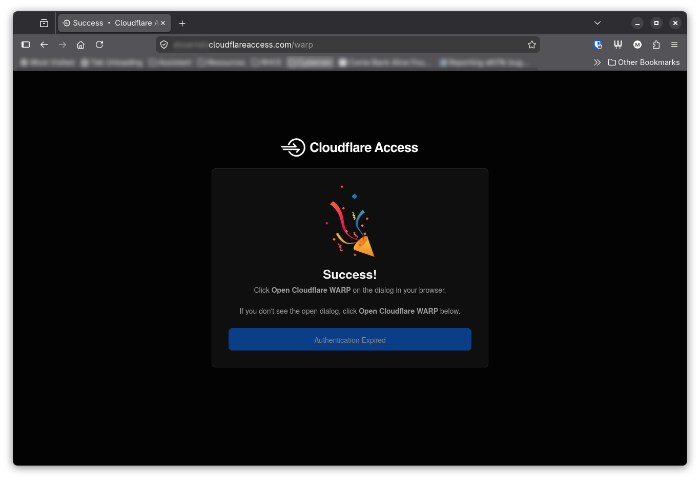
https://my-org-name.cloudflareaccess.com/where “my-org-name” is your Zero Trust team name. - Click on the blue button
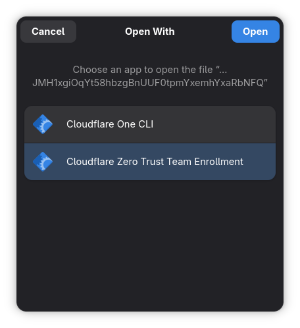
- Select Team Enrollment
- You can now verify that the registration worked out
$ warp-cli registration show
Account type: Team
ID: <id>
Device ID: <id>
Public key: <key>
Account ID: <id>
Organization: my-org-name
5. Updating cloudflare-warp
After running home-manager switch to upgrade the package, the store path hash will change.
To apply the required SELinux labels once again, simply re-run our script:
sudo ./warp-relabel.sh
Conclusion
And that is it. With Nix Home-Manager, we have successfully worked around Cloudflare’s outdated dependency chain and restored WARP functionality on Fedora 44. The solution is clean: system packages remain untouched, updates are handled through Nix, and SELinux policies are respected.
This experience reinforced my appreciation for Nix’s approach to package management. By isolating dependencies and providing declarative configuration through Home-Manager and Flakes, it turned what could have been a frustrating dead-end into a fairly manageable and isolated workaround.
The only remaining question is: when will Cloudflare update their repository to support current Fedora releases?