
Fixing the Missing Power Mode in GNOME on OpenSUSE Tumbleweed With TuneD
My fleet is no longer pure Fedora. Between Fedora and openSUSE Tumbleweed machines, I want the boring layer underneath - power, thermals, battery - to behave the same everywhere. Learn it once, copy one config file between machines, move on.
Fedora made that easy. Since Fedora 41, TuneD has replaced power-profiles-daemon as the default power profile manager on Workstation, as well as the KDE and Budgie spins (the change proposal has the reasoning). It has worked well on my machines, and GNOME’s Power Mode toggle keeps working exactly as before.
Fedora’s stated case is a wider set of profiles, a customizable mapping, and less to maintain. For backdrop, power-profiles-daemon’s author, Bastien Nocera, announced in August 2023 that he was moving to other work and that his freedesktop projects, this one included, would be archived until further notice. The post never mentions TuneD and Fedora’s proposal does not cite it, so I would not call it the reason. The project has since carried on under the upower group on freedesktop GitLab.
Then I logged into a Tumbleweed GNOME session and found no Power Mode in the quick settings menu, none in Settings → Power, and an Auto Power Profile extension that sat there doing nothing.
Tumbleweed does not install TuneD by default. And even once you install it, GNOME has no idea it exists. Luckily, there is no reason to suffer that.
The Setup
- Host: openSUSE Tumbleweed, snapshot
20261031, kernel7.3.0-1-default - Desktop: GNOME
51.1(Wayland) - Packages:
tunedandtuned-ppd, both2.28.0 - SELinux: enforcing,
selinux-policy-targeted20261019
The Problem: GNOME Does Not Speak TuneD
GNOME Shell and gnome-control-center only talk to one thing: the power-profiles-daemon D-Bus API (net.hadess.PowerProfiles and org.freedesktop.UPower.PowerProfiles). They know nothing about TuneD’s own interface, com.redhat.tuned.
On Fedora, a small package called tuned-ppd sits in between and translates one API into the other. It is the integration. No tuned-ppd, no profile entries in GNOME, and no way for extensions to switch profiles.
On Tumbleweed, tuned-ppd is a separate package that nothing pulls in. On my install, gnome-control-center has a weak dependency on a PPD provider, but it names a capability (ppd-server) that no package in the repos provides. Both power-profiles-daemon and tuned-ppd provide ppd-service instead. I could not read the spec file, so I can’t say for sure, but it would explain why a stock GNOME install ends up with no backend at all.
$ rpm -q --recommends gnome-control-center | grep -i ppd
ppd-server

$ zypper se --provides ppd-server
No matching items found.

$ zypper se --provides ppd-service
  power-profiles-daemon   (Main Repository (OSS))
  tuned-ppd               (Main Repository (OSS))
For the wider debate on whether Tumbleweed should switch defaults, see openSUSE bug 1244046. It is an open proposal, and the maintainer who replied is not opposed but not convinced yet. Until that settles, this is opt-in.
Step-by-Step
1. Install TuneD and the bridge
sudo zypper install tuned tuned-ppd
tuned-ppd declares a conflict with ppd-service, which power-profiles-daemon provides. So the two cannot be installed together. I started with neither, so I never hit this - if you already have power-profiles-daemon, zypper should offer to swap them.
2. Enable both services
sudo systemctl enable --now tuned tuned-ppd
You need both. tuned-ppd ships disabled (preset: disabled) and requires tuned.service. The unit is wanted by graphical.target, so it starts on boot once enabled.
For me, this is where it went wrong.
3. If tuned-ppd fails: the SELinux label
Job for tuned-ppd.service failed because the control process exited with error code.
systemctl status only shows exit code 1, and regular users cannot read the system journal, so:
$ sudo journalctl -u tuned-ppd -b --no-pager | tail -30
[...traceback frames trimmed...]
... tuned-ppd[92867]:   File "/usr/lib64/python3.13/logging/__init__.py", line 1248, in _open
... tuned-ppd[92867]: PermissionError: [Errno 13] Permission denied: '/var/log/tuned/tuned-ppd.log'
... systemd[1]: tuned-ppd.service: Main process exited, code=exited, status=1/FAILURE
... systemd[1]: Failed to start PPD-to-TuneD API Translation Daemon.
The unit runs tuned-ppd -l, which logs to a file. It runs as root, so a plain permission problem makes no sense. With SELinux enforcing, a Permission denied for root points to labels:
$ ls -dZ /var/log/tuned /var/log/tuned/tuned.log /usr/sbin/tuned-ppd
system_u:object_r:var_log_t:s0         /var/log/tuned
system_u:object_r:tuned_log_t:s0       /var/log/tuned/tuned.log
system_u:object_r:tuned_ppd_exec_t:s0  /usr/sbin/tuned-ppd

$ grep tuned /etc/selinux/targeted/contexts/files/file_contexts | grep log
/var/log/tuned(/.*)?	system_u:object_r:tuned_log_t:s0
There it is. /usr/sbin/tuned-ppd runs in its own confined domain, tuned_ppd_t. The policy lets that domain create files in a tuned_log_t directory, but the directory on disk is plain var_log_t, where it only gets read-type access. The policy says the label should be tuned_log_t. The disk disagrees.
My reading of how this happened: the RPM owns /var/log/tuned as a %ghost entry (rpm -V tuned flags it with g), so the package does not ship the directory. tuned creates it at runtime, and it inherits its parent’s label. I have not reproduced this on a clean install, so I can’t promise you will hit it. If the service starts fine for you, skip this step.
The fix is a relabel to what the policy already says:
$ sudo restorecon -Rv /var/log/tuned
Relabeled /var/log/tuned from system_u:object_r:var_log_t:s0 to system_u:object_r:tuned_log_t:s0

$ sudo systemctl restart tuned-ppd
No chmod, no setenforce 0. If you want the longer version of why that is the right instinct, I covered it in debugging a silent SELinux denial and fixing a mislabeled systemd binary.
4. Verify
$ systemctl is-active tuned tuned-ppd
active
active

$ busctl --system list | grep PowerProfiles
net.hadess.PowerProfiles               2521 tuned-ppd  root  :1.23  tuned-ppd.service  -  -
org.freedesktop.UPower.PowerProfiles   2521 tuned-ppd  root  :1.23  tuned-ppd.service  -  -

$ sudo tuned-adm active
Current active profile: balanced
Both bus names now have an owner, and it is tuned-ppd. (On Tumbleweed tuned-adm lives in /usr/sbin, which is not on a regular user’s PATH, hence sudo.) This also survived a reboot - both services were back and active at boot.
If GNOME does not show the new entries straight away, close and reopen Settings. If the quick settings menu still lacks them, log out and back in with gnome-session-quit --logout. GNOME may have checked for the service before it existed.
What You Get in GNOME
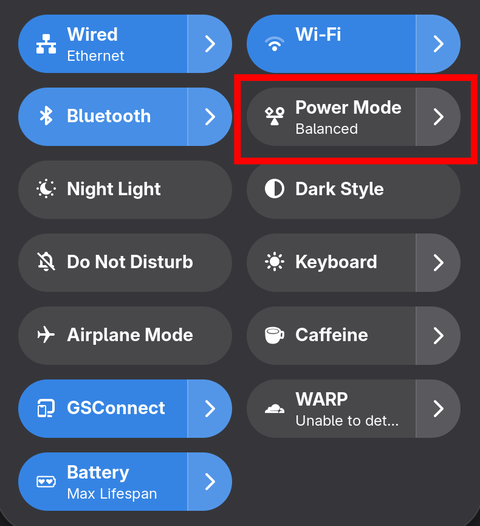
The Power Mode tile appears in quick settings:
And Settings → Power gets its Power Mode section back, with the three familiar choices:
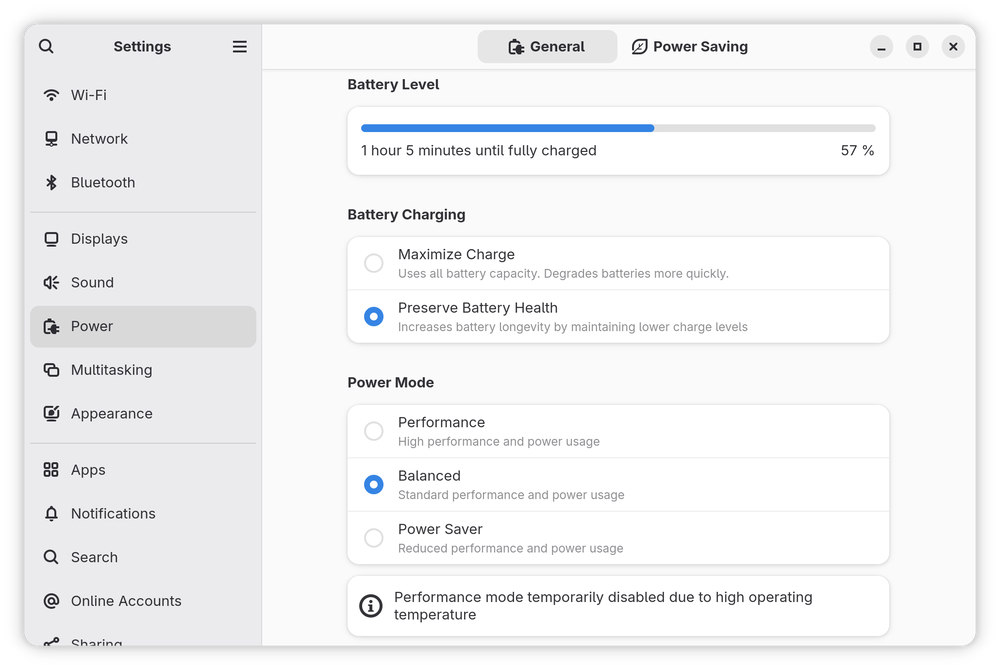
The notice at the bottom - “Performance mode temporarily disabled due to high operating temperature” - is tuned-ppd at work too.
Automatic Switching with Auto Power Profile
The part I missed most was automatic switching: power saver on battery, balanced on AC, without thinking about it. Auto Power Profile does exactly that. It is a GNOME extension that listens to power state and flips the profile through - you guessed it - the power-profiles-daemon API. Without tuned-ppd, it has nothing to talk to. With it, TuneD simply follows along.
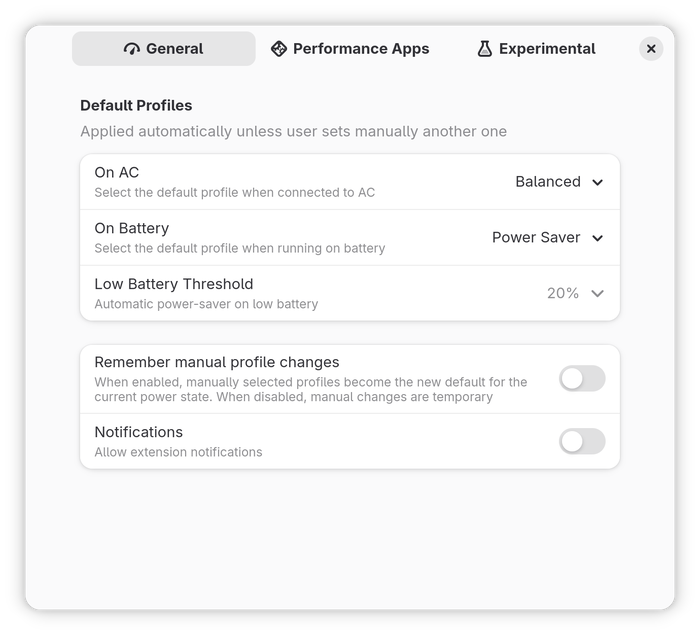
My settings: Balanced on AC, Power Saver on battery, and a 20% low-battery threshold. I left “Remember manual profile changes” off, so a manual choice from the menu is temporary and the extension takes over again on the next power event.
Mind the usual caveat with extensions: check compatibility before a GNOME upgrade, as I described in this earlier post.
How the Pieces Fit Together
GNOME Shell / Settings / Auto Power Profile
        │   power-profiles-daemon D-Bus API
        ▼   (net.hadess.PowerProfiles, org.freedesktop.UPower.PowerProfiles)
     tuned-ppd          ← translation layer, reads /etc/tuned/ppd.conf
        │   TuneD D-Bus API (com.redhat.tuned)
        ▼
      tuned             ← applies the profile
        │
        ▼
  sysfs / kernel: cpufreq, ACPI platform_profile, SATA link power, panel, ...
The mapping: /etc/tuned/ppd.conf
GNOME only knows three names. tuned-ppd maps each one to a TuneD profile using this file, which the tuned-ppd package installs:
[main]
# The default PPD profile
default=balanced
battery_detection=true
sysfs_acpi_monitor=true

[profiles]
# PPD = TuneD
power-saver=powersave
balanced=balanced
performance=throughput-performance

[battery]
# PPD = TuneD
balanced=balanced-battery
With battery_detection=true, picking Balanced while on battery selects balanced-battery instead. Want a different TuneD profile behind one of the three names? Edit the right-hand side and sudo systemctl restart tuned-ppd. That is the whole customization story, and it is the main thing power-profiles-daemon cannot do.
What each profile actually changes
I read these out of /usr/lib/tuned/profiles/*/tuned.conf. The list is trimmed to what matters for power and heat:
| GNOME entry | TuneD profile | Key settings |
|---|---|---|
| Power Saver | powersave |
CPU boost off, EPP power, ACPI platform profile low-power (falls back to quiet), panel power saving level 3 |
| Balanced (AC) | balanced |
EPP balance_performance, boost on, platform profile balanced |
| Balanced (battery) | balanced-battery |
Inherits balanced, EPP balance_power, panel power saving 1 |
| Performance | throughput-performance |
Governor performance, EPP performance, min_perf_pct=100, platform profile performance |
EPP is the CPU’s Energy Performance Preference hint, and you can see it live:
$ cat /sys/devices/system/cpu/cpu0/cpufreq/energy_performance_preference
balance_performance
That matches the active balanced profile.
Closing Thoughts
None of this is complicated once you know where the seam is. TuneD does the work, tuned-ppd makes it look like the thing GNOME expects, and an extension on top automates the switching. The only real friction on Tumbleweed was packaging: a missing bridge and a mislabeled log directory.
Whether Tumbleweed should ship this by default is a fair debate, and it is happening in bug 1244046. Until then, ten minutes and two packages get you the same setup I run on Fedora.
If you are chasing battery life on a laptop, you may also like my older posts on Dell XPS battery tuning with S3 deep sleep and battery charge thresholds.
Hope this helps!