
Sandboxing OpenCode With Bubblewrap and Anthropic's Sandbox Runtime
Over the past six to twelve months, the industry has quietly crossed a line. AI coding agents are now good enough, even without necessarily reaching for a frontier model, that they’ve become a genuine accelerator rather than a novelty. Even the best developers I know - people who are decade-long contributors to major languages - either lean on them to do things that simply wouldn’t have been efficient to do otherwise, or use them the way you’d use a junior developer: a second pair of hands to delegate to and review after. Either way, the tools moved from “interesting toy” to “load-bearing part of the workflow” faster than most of us expected. And short of a significant hike in token pricing, I don’t see this trend reversing - the economics simply favor throwing an agent at the problem first.
The space is also moving fast enough that I’ve settled into a habit of doing a roundup every three to four months - at most once a quarter - going through the main coding agents, the key players, the up-and-comers making noise, and seeing who’s actually pulling ahead on real work rather than benchmarks.
Lately, I came back to OpenCode. What brought it back into my main toolset is how well it performs across a wide range of models rather than locking me into one vendor’s idea of what a coding agent should be - I can point it at Claude, GPT, Mistral, Z.ai, or even the latest Tencent model - whatever’s best for the task that day, without switching tools.
The problem is that OpenCode ships without any form of sandbox. It runs as your user, with your permissions, and it will happily do whatever it decides is reasonable to accomplish the task at hand. Turns out, it has a rather generous definition of “reasonable.”
My workaround so far - and why it wasn’t enough
Up to now, my answer to this had been to run agents on VMs and connect to them remotely - VS Code’s Remote SSH, Zed’s remote editing feature, that sort of thing. It works, in the sense that the agent isn’t running directly on my laptop. But it’s not really solving the problem, it’s just relocating it. You’ve moved the blast radius from your workstation to a VM - which is strictly better, sure, but far from perfect. If that VM holds secrets for more than one project, or you’re running multiple agents against it, OpenCode will still happily wander into places it has no business being, just on a different machine.
Then there’s the MCP server problem, which is arguably worse. A lot of Model Context Protocol servers are genuinely useful, and there are plenty more I’d like to use. But using one means running Python or Go code written by someone you know nothing about, on your machine (or that VM), with essentially full privileges and zero control over what it touches or installs. That’s a security incident waiting to happen, not a hypothetical one. I’ve written before about containerizing MCP servers with Podman as a partial mitigation - and it does help - but not every MCP server ships an image, which means you’re now in the business of building and maintaining your own, for every server, indefinitely. That overhead adds up fast.
A Concrete Example
If you run OpenCode day to day, you’ve probably already noticed it can be very liberal about what it decides is fine to do.
One that made it concrete for me happened on one of the VMs I run these agents against. I asked it to generate a banner image with the Terraform logo embedded in it - a reasonable enough ask. What it decided to do, entirely on its own, was run a find across the root of the filesystem - not a home directory, the box’s actual OS root - hunting for any image file with “terraform” somewhere in the name.
Is the reasoning behind that even bad? Not really, on its face. I use Terraform, there’s a decent chance a Terraform-branded asset exists somewhere on disk, and finding it beats generating one from scratch. But that’s exactly the point: the agent should have asked before deciding that a filesystem-wide scan was an acceptable way to answer “make me a banner.” It didn’t ask, it just did it - and it’s precisely the kind of quietly-reasonable-until-it-isn’t behavior you don’t want unattended, VM or not.
The sandboxing landscape on Linux
Once you start looking, you fall down a rabbit hole fast - some agent orchestrators implementing their own sandboxes (although that’s still rare), half a dozen wrapper projects, each building on a different primitive. On Linux, it really comes down to three options:
- Bubblewrap - namespace-based sandboxing, no shared root, no daemon required. Very lightweight.
- Containers (Docker or Podman) - Docker has clearly noticed this wave; they’ve shipped their own AI-agent sandboxing solution recently. I haven’t evaluated it myself, because I don’t run Docker - I use Podman. But it looks neat.
- VMs or micro-VMs - the strongest isolation there is, because there’s no shared kernel.
VMs and micro-VMs give you the best isolation guarantees, full stop - but frankly, kernel-level exploits are well outside the threat model that matters for an AI coding agent. If that’s genuinely your concern, you shouldn’t be running that workload on a workstation at all, sandboxed or not. For our problem, the overhead isn’t worth it.
Containers are great - I’m a genuine fan of running Podman on a workstation day to day. But the friction here is the same friction you hit with dev containers generally: you either have to bring your entire dev toolchain into the container image, or reach for something like Distrobox to wire your filesystem in - at which point you’ve undone a chunk of the isolation you were trying to get in the first place.
Bubblewrap sidesteps both problems. No daemon, no shared root, no need to rebuild your entire toolchain inside a container image - and it’s already proven itself at scale via Flatpak.
Enter Bubblewrap
Between those three, Bubblewrap was the clear pick.
If you run Fedora and/or Flatpak, you already know it - it’s what Flatpak sandboxes apps with, and it’s why I swap RPMs for their Flatpak equivalent whenever one exists, especially for the usual malware entry points like browsers and PDF readers. A genuine security upgrade - more on that in my Firefox on Fedora post and my Linux workstation security primer.
I’d also poked at Bubblewrap once before in a different context - sandboxing Nix package builds at runtime - but that’s a topic for another post.
For the AI agent problem specifically, that meant sandboxing OpenCode itself in Bubblewrap.
Why Anthropic’s Sandbox Runtime specifically
When it comes to sandboxing AI agents on top of Bubblewrap specifically, there are a handful of projects out there and one that stands apart: Anthropic’s Sandbox Runtime, or srt.
As you’d expect from anything Anthropic ships, it picked up attention fast - past 4.7k stars on GitHub at the time of writing. Interestingly, it’s released under their anthropic-experimental organization rather than the main Anthropic org, which tells you something about how they’re positioning it: a research preview, not (yet) a fully committed product.
A few things pulled me toward srt over rolling my own Bubblewrap policy, or picking one of the smaller alternatives:
- It’s actively maintained, with enough community weight behind it that I can reasonably expect it to keep improving rather than going stale after six months.
- It’s runtime-agnostic. The README’s own examples wrap plain
curlcommands, which tells you it’s built to sandbox any process, not just AI agents specifically - there’s clearly room to use it for more than this one use case. - Configuration is just JSON. No hand-rolled Bubblewrap seccomp profiles, no bind-mount incantations to get right - a settings file with an allowlist for network domains and filesystem paths, and it takes care of the rest.
Setting it up
Install
Per the README, the straightforward path is:
npm install -g @anthropic-ai/sandbox-runtime
My preferred path, though, is Nix via home-manager - I’ve covered why I lean on Nix for exactly this class of tool (fast-moving, security-sensitive, third-party) in my Nix adoption post, so I won’t re-litigate that here. sandbox-runtime is packaged in nixpkgs, though - being a young, fast-moving project - I track it via the nixos-unstable channel rather than a stable release, alongside a couple of other tools that update often enough that pinning to a stable channel would leave me chasing releases manually:
# flake.nix
{
  inputs = {
    nixpkgs.url = "github:nixos/nixpkgs/nixos-26.05";
    nixpkgs-unstable.url = "github:nixos/nixpkgs/nixos-unstable";
    home-manager = {
      url = "github:nix-community/home-manager/release-26.05";
      inputs.nixpkgs.follows = "nixpkgs";
    };
  };

  outputs = { nixpkgs, nixpkgs-unstable, home-manager, ... }:
    let
      system = "x86_64-linux";
      pkgs = import nixpkgs { inherit system; };
      pkgs-unstable = import nixpkgs-unstable { inherit system; };
    in {
      homeConfigurations."YOUR_USERNAME" = home-manager.lib.homeManagerConfiguration {
        inherit pkgs;
        modules = [ ./home.nix ];
        extraSpecialArgs = { inherit pkgs-unstable; };
      };
    };
}
# home.nix
{ config, pkgs, pkgs-unstable, ... }:

{
  home.packages = with pkgs; [
    # ... your regular packages
  ] ++ [
    pkgs-unstable.opencode
    pkgs-unstable.sandbox-runtime
  ];

  programs.home-manager.enable = true;
}
cd ~/.config/home-manager
nix run home-manager/release-26.05 -- switch --flake .
Either way, you end up with an srt binary on your PATH.
The config file
srt reads a JSON settings file - by default ~/.srt-settings.json, though you can point it anywhere with --settings. I keep mine as a dedicated profile for OpenCode, and it boils down to two pairs of allow/deny lists: which network domains the sandboxed process can reach, and which filesystem paths it can read and write.
⚠️ Network is allow-only - everything is denied by default, and access is opt-in per domain. Writes work the same way: denied everywhere by default, opt-in per path. Reads default the other way around - allowed everywhere, until you deny a region and (optionally) re-allow specific paths inside it.
My first pass at this file only used that last part to block ~/.ssh - which meant the sandbox could still read essentially my entire home directory. Fine for write safety, not exactly “sandboxed” in the sense I actually wanted. So the version below denies the whole home directory for reads, then re-opens exactly the paths OpenCode needs:
{
  "network": {
    "allowedDomains": [
      "pypi.org",
      "files.pythonhosted.org",
      "npmjs.org",
      "*.npmjs.org",
      "crates.io",
      "*.crates.io",

      "github.com",
      "*.github.com",
      "*.githubusercontent.com",

      "openrouter.ai",
      "api.z.ai",
      "api.mistral.ai",

      "cache.nixos.org",

      "models.dev"
    ],
    "deniedDomains": [],
    "allowUnixSockets": ["/nix/var/nix/daemon-socket/socket"],
    "allowAllUnixSockets": true,
    "allowLocalBinding": false
  },
  "filesystem": {
    "denyRead": ["~"],
    "allowRead": [
      "~/.config/opencode",
      "~/.local/share/opencode",
      "~/.cache/opencode",
      "~/.local/state/opencode",

      "~/.cache/nix",
      "~/.local/state/nix",

      "~/.agents",
      "/tmp",
      ".",
      "~/Development",
      "~/.superset/worktrees",

      "~/.nix-profile",
      "~/.local/bin",

      "~/.gitconfig",
      "~/.gitignore_global",
      "~/.gitmessage"
    ],
    "allowWrite": [
      "~/.config/opencode",
      "~/.local/share/opencode",
      "~/.cache/opencode",
      "~/.local/state/opencode",

      "~/.cache/nix",
      "~/.local/state/nix",

      "~/.agents",
      "/tmp",
      ".",
      "~/Development",
      "~/.superset/worktrees"
    ],
    "denyWrite": []
  },
  "enableWeakerNestedSandbox": false,
  "enableWeakerNetworkIsolation": false,
  "allowAppleEvents": false
}
A few things worth calling out, because they weren’t obvious to me going in:
A bare domain does not cover its subdomains. github.com in the allowlist does not also allow api.github.com - you need *.github.com explicitly.
Unix sockets are all-or-nothing on Linux. This one surprised me. srt blocks Unix domain socket creation via a seccomp-BPF filter, and seccomp filters can only inspect syscall arguments - integers and flags - not dereference a pointer into the process’s memory to read a socket path string. So on macOS, where Seatbelt profiles can express path-scoped rules natively, allowUnixSockets: ["/some/specific.sock"] works exactly as you’d hope. On Linux, that same field is silently ignored, and the only lever is the blunt allowAllUnixSockets: true / false toggle - all local sockets or none. I ran into this directly: I run Nix in multi-user daemon mode, and nix develop/nix build need to talk to nix-daemon over /nix/var/nix/daemon-socket/socket. There’s no way to scope that on Linux, so allowAllUnixSockets: true it is - meaning the sandboxed process can also reach any other local socket my filesystem permissions expose (Docker socket, ssh-agent, gpg-agent, and so on). Worth knowing about before you flip it, not after.
Denying a directory for reads doesn’t mean everything under it errors out. On Linux, srt implements this by bind-mounting your entire root read-only, then layering an empty mount over whatever you deny and binding your allowed paths back on top. Practically, that means ls ~ inside the sandbox doesn’t fail - it just shows a home directory that only contains the handful of paths I explicitly re-allowed, as if the rest never existed.
Running it
srt --settings ~/.srt/srt-opencode.json opencode
I’ve deliberately not aliased this to a plain opencode shell alias. It’s tempting - fewer keystrokes - but I want to keep deciding which settings profile applies in a given context rather than have one default silently apply everywhere. Different projects, different trust levels, different allowlists.
Edge case: wiring this into an agent orchestrator
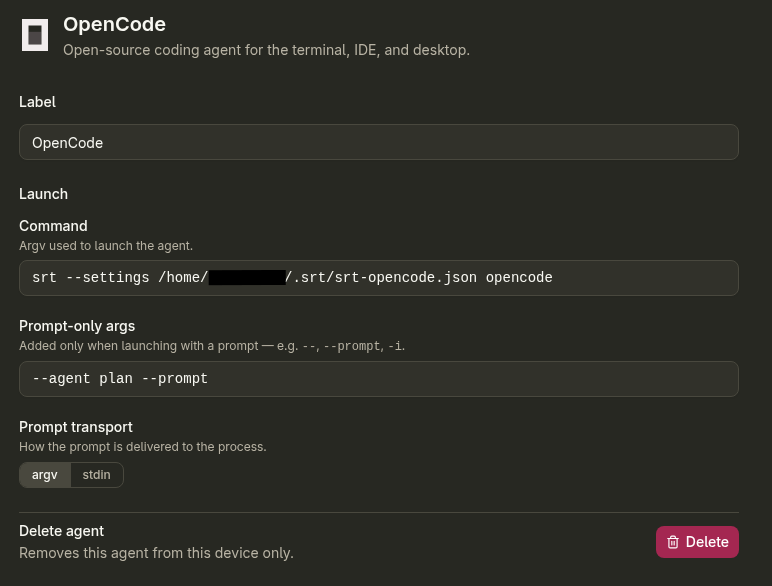
I’ve recently started running most of my agent sessions through Superset, which manages git worktrees and launches agents per-branch. Plug the srt-wrapped command in as Superset’s OpenCode launch command, and it returns:
Error: Could not load settings from ~/.srt/srt-opencode.json (missing, unreadable, or invalid). Refusing to run with the default config.
The issue comes from Superset spawning the agent process directly as an argv array rather than through a shell. $HOME and ~ are shell features and a direct spawn()/execve() call skips that step entirely. srt was receiving the literal, unexpanded string ~/.srt/srt-opencode.json, trying to resolve it relative to the worktree’s working directory, and finding nothing. The fix is simply to use an absolute path in the launch command instead:
srt --settings /home/YOUR_USERNAME/.srt/srt-opencode.json opencode
Closing thoughts
None of this makes OpenCode “safe” in some absolute sense - nothing running arbitrary generated code ever is. But it turns an agent with silent, unrestricted access to your entire home directory and the open internet into one that can only touch what you’ve explicitly allowed - and if you’re running AI coding agents today, that shouldn’t be optional.
Hope this helps!